|
|
||
|
|
||
 WELCOME BACK: The AllAmerican RunnerDuck Review has reached another milestone. We signed up our 3,000th subscriber this week. This is starting to get exciting. Just a couple of months ago we only had about a thousand and now we're growing like crazy. A lot of that growth is due to your kind words and telling your friends about us. We really appreciate your ongoing support and we'll do everything to hold up our end.
We are getting a little overwhelmed with the outpouring of patriotism for
the upcoming observation of the September 11th one-year anniversary. We're
sure you've see lots of emails on different peoples ideas for showing your
solidarity, turn your lights on, wear red, white and blue, say the pledge of
allegiance at noon, etc. It really doesn't matter what you do as long as you
say a prayer for the victims, families and all those who have suffered from
this horrific event. It's really hard to believe that it's already been a
year since this happened. No matter what, one thing we will never do is
forget. God bless all those poor souls.
WELCOME BACK: The AllAmerican RunnerDuck Review has reached another milestone. We signed up our 3,000th subscriber this week. This is starting to get exciting. Just a couple of months ago we only had about a thousand and now we're growing like crazy. A lot of that growth is due to your kind words and telling your friends about us. We really appreciate your ongoing support and we'll do everything to hold up our end.
We are getting a little overwhelmed with the outpouring of patriotism for
the upcoming observation of the September 11th one-year anniversary. We're
sure you've see lots of emails on different peoples ideas for showing your
solidarity, turn your lights on, wear red, white and blue, say the pledge of
allegiance at noon, etc. It really doesn't matter what you do as long as you
say a prayer for the victims, families and all those who have suffered from
this horrific event. It's really hard to believe that it's already been a
year since this happened. No matter what, one thing we will never do is
forget. God bless all those poor souls.
We can imagine that there will be millions of Americans displaying the American flag on and around September 11th. We'd like to remind you once again that it's important to display it properly. Nothing is worse than a ratty looking flag that is not hung correctly.
To make sure you are doing it right and to show your children the correct way we would suggest going to www.ushistory.org/betsy/flagetiq.html. Pretty much everything you ever wanted to know about the American flag can be found at that site. I got to tell you that we have a number of correct answers already so it's going to come down to a drawing. If you haven't entered yet do it NOW! This is strictly for fun with no requirements on any one except guessing the correct number.
How many "S" were there in the title of August 23rd's newsletter "Recipe of the Week"? Ron Godin has been busy with all the arts and crafts fairs that are going on but he still has time to make a special sign for you. His rustic Adirondack art is really something to see. Just go to www.runnerduck.com/crafts.htm and see what he has for you. You are logged on to this newsletter as [[-Email-]] and receiving it because you are a friend of mine or a friend of theirs. If you would like to be removed from receiving this newsletter just send an email to unsubscribe@runnerduck.com leaving the Subject and Body blank.
Thank you,
VISIT OUR HOME PAGE AT www.runnerduck.comCheck Out Archive Newsletters Here |
Please visit our affiliate sites listed below. Your purchases help us keep this newsletter going. Thank you!
|
 |
|
Please vote for our newsletter at |
|
 |
|
 |
|
 Launch your
web site for only $9.95 per month with your special Duck Discount at  |
|
What's New This Week? Ken is going in for some major surgery on his right shoulder. About seven years ago he fell from a deck we were building and shattered his shoulder along with six breaks in his left wrist and a hairline fracture in his leg. Everything healed up really good except his shoulder. Due to a high level of activity it is worn down to almost nothing. Tuesday he goes under the knife to have a whole new shoulder installed. This won't be easy since things just aren't normal from the first fall. After a two or three day hospital say he should be back on the mend with physical torture close behind. Since Ken is right handed and does the lion's share of putting the RunnerDuck Review together the next couple of weeks might be a little sparse. Just bare with us because things will be back to normal and better soon. We could really use your help if you have a project that you'd like to share with our readers. It's going to be difficult for Ken to build anything for a few weeks and you could really help by stepping forward. We are looking for woodworking, gardening, or craft type projects. Just drop us a line, projects@runnerduck.com, with what you have and we'll do the rest. We really would appreciate that! DigiTalkFirst of all check that there is plenty of room around the computer so it can breathe. Second, make sure that the main fan in the back is working and clean. Third, now don't get nervous, take the cover off of your computer and check inside. Blow all the dust out of it and check the fans. Most computers will run with the covers off so power up your computer and see if the fans are running. DON'T touch anything in there especially with the power on. We don't want you to get a shock and we don't want you to shock your computer. You body can build up a charge that can damage electronic components if you touch them. Just blow the dust out and keep your fingers out of the way. Your computer will love you and you'll love the way your computer keeps running for years to come. SITE OF THE WEEKHow would you like to have a word processor that works and acts like Word? How about a spreadsheet program very similar to Excel? It would be nice to have a presentation program like Power Point wouldn't it? You could probably even use a graphics program like Draw! Well how would you like to have all of this for FREE!!! I found this hard to believe but OpenOffice.org offers these programs for free. There are no strings attached and they appear to work great. The software is open architecture, which means that no one really owns the software, and anyone can contribute to it. The source code is available for anyone to work on. Unlike Microsoft Office which Microsoft owns and controls. OpenOffice.org is like a community effort to make something that works great. In checking it out I found that Verizon is using it in their offices as a replacement for their existing Office products. Here's the catch. Wait a minute you said that I got all of this for free! Well you do but it's a 52 MEG file that can take a while to download if you have a slow modem. On the OpenOffice.org site they have a list of places where you can purchase the CD. I checked some of these out and most of them are around $6.00 to cover postage and handling. Not bad compared to the potential hundreds you'd pay for comparable software. We hope you check this one out because it is just too good to pass up. KIDS CORNER
School has started and that means that you have lots of books to cover. As long as you have to cover them you may as well make them pretty.
Here's what you'll need:
Paper grocery bag
Cut down the seam of the paper bag and unfold the bottom. 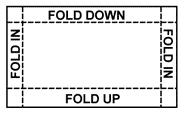 Slip the ends over the cover and back of the book. Now the fun begins. Cut some fun pictures out of magazines, calendars or photos. It's really fun to use pictures of your friends. Glue the pictures onto your book cover. Add a title to identify your book and you are ready to go.  Click on the picture or a bigger image This might just make going to school a little more fun. We really hope you enjoy our kid's projects. Marilyn puts forth a lot of effort each week to bring you these great ideas. She could really use your help with ideas for future newsletters. If you have a kid's project that would be suitable for our newsletter we'd love to share it with our readers. Just contact marilyn@runnerduck.com and we'll do the rest. Remember we have all of our past kids projects archived on our web site at www.runnerduck.com/kids_corner.htm.
It's been a while since we mentioned Alexia's Books. Since we are making book covers this week it reminded us of their great product. They offer children's books that are customized for that special child in your life.
When you purchase one of their books they ask some questions like the child's name, the town they live in and others. This information is then printed in the child's Custom Book. All of their books can be read on line, less the pictures, so you can see how they will look. 
RunnerDuck Toy Store.
Oh boy, Sunday we play for the 50th anniversary of the World War II cryptographers. I hope I get a few minutes during our breaks to chat with some of these folks. They should have some really interesting stories to tell.
The world lost another great musician this past week. It seems like this year has had a terrible toll on some of our oldest and greatest musicians. Lionel Hampton passed away at the age of 94. He is one of the most fantastic vibraphone players the world has ever known.
If there is a big band or jazz group that you can think of he has more than likely played with them or some of their members. The Tempos play "Flying Home" one of his finest swing compositions. We will really miss this wonderful man but fortunately we have his music to listen to forever.
 Joke of the Week
A Cajun was stopped by a game warden in Southern Louisiana recently
with two ice chests of fish, leaving a bayou well known for its fishing.
The game warden asked the man,
"Do you have a license to catch those fish?" The RunnerDuck Goodies Store |
 THIS WEEKS FREE RECIPE THIS WEEKS FREE RECIPE
Put all the ingredients in a small jar and shake well.
Thanks again mom for being right!
Remember, if you have a recipe you'd like to share please send it to marilyn@runnerduck.com.
Every month we post a new recipe on our web page. Be sure and check out our NEW September recipe at the RunnerDuck Kitchen Store. We'd be happy to post your favorite recipe there or in our newsletter and give you credit. Just drop a line to marilyn@runnerduck.com
COOKBOOK
|
Please tell a friend about RunnerDuck Review
It only takes a second and you can
|